Difference between revisions of "Movement"
imported>Marvin m (PlayerMovement moved to Movement) |
imported>Isadora (Trimmed some fat and updated some out-of-date notes and conventions. Organized into proper sections, and added a note on the longexits pref in a notebox.) |
||
| Line 1: | Line 1: | ||
''I like to move it move it...'' | |||
This page is a short guide on mooching around on foot in HellMOO. By the end of it, you'll be able to go out for smokes and get back home without faceplanting your keyboard. This page is a little more up-to-date than the {{cmd|help movement}} guide in-game, so buckle up. | |||
Basic movement is compromised of the eight compass directions, up/down, and in/out | == Basic Directions == | ||
Basic HellMOO movement is compromised of the eight compass directions, up/down, and in/out. Going in a direction is as simple as typing in the direction you want to go. Assuming the direction you specify is valid, that's the way your character will go. To check which directions are valid, look at the bottom the description of the area you're in. You'll see a readout like this: | |||
[ Exits: north south *east(door) west ] | [ Exits: north south *east(door) west ] | ||
{{notebox|Screen clutter!|If you're used to compass directions and don't need full spellings of the directions anymore, try this:<br>{{cmd|@prefs longexits is 0}}<br>This will abbreviate "west" to "w" and so on.}} | |||
This readout means that you can go east, west, north or south. East can also be reached by typing "door". The star next to "east" means that the pathway is closed. If you can {{cmd|open}} it, you can walk through, though it may be locked. For some special directions, you'll need to type the full name of the direction you want to go. | |||
Normal directions without doors are highlighted in blue. You can type either {{cmd|west}} to go east, or simply {{cmd|w}}. Once you've got that down, you can try the {{cmd|go}} command. Try {{cmd|go w w w w}} and observe as you move four tiles in a westerly direction with blistering speed! | |||
== Seeing Your Location == | |||
Where are you? Try {{cmd|look}}. You should see the name of your location at the top of your tile's description. It'll look something like this: | |||
Fourth Ave - 500 block (freedom city) 6:43pm | Fourth Ave - 500 block (freedom city) 6:43pm | ||
Pretty simple. | Pretty simple. We're at Fourth Ave - 500 block in Freedom City at 6:43pm. Below this readout, you'll see a nice minimap: | ||
[[image:Map.jpg]] | [[image:Map.jpg]] | ||
The minimap has a 5x5 block range with you in the middle, the blue (). | The minimap has a 5x5 block range with you in the middle, the blue (). You can see abbreviations for various buildings and locations, like "AP" for [[Any Port]]. During the daytime, this thing has color. At night, it's dark, so you can only see it in black and white. | ||
You also have a wristpad in your inventory, and can use it to see a map: try {{cmd|lmap}} to see a detailed graphical map of your area, split into tiles, with little lines and extra data on the side telling you all you could need to know! It even shows your [[corp|corpmates]], if they're nearby. If you're feeling old school, you can also try {{cmd|map}}, which looks like this: | |||
[[image:Gmap.jpg]] | [[image:Gmap.jpg]] | ||
== Watching Your Step == | |||
Surprise surprise, the post-apocalyptic world is less than safe. [[Freedom City]] isn't so bad, but out in the big bad gameworld, it's smart to {{cmd|look}} before you walk. Try {{cmd|l direction}} to see where you're going and avoid RoboRapist3000. Obviously, you can't look through closed doors. | |||
In addition, be careful of exits that are marked in {{color|red||red}} or {{color|blue||blue}}! Red exits are [[climb]]s, and without sufficient climb skill, you may fall off of them and swan-dive into concrete. Blue exits are water exits, which require [[swim]] skill to do important things like not drown. | |||
Latest revision as of 14:31, 6 May 2019
I like to move it move it...
This page is a short guide on mooching around on foot in HellMOO. By the end of it, you'll be able to go out for smokes and get back home without faceplanting your keyboard. This page is a little more up-to-date than the help movement guide in-game, so buckle up.
Basic Directions
Basic HellMOO movement is compromised of the eight compass directions, up/down, and in/out. Going in a direction is as simple as typing in the direction you want to go. Assuming the direction you specify is valid, that's the way your character will go. To check which directions are valid, look at the bottom the description of the area you're in. You'll see a readout like this:
[ Exits: north south *east(door) west ]
If you're used to compass directions and don't need full spellings of the directions anymore, try this:
@prefs longexits is 0
This will abbreviate "west" to "w" and so on.
This readout means that you can go east, west, north or south. East can also be reached by typing "door". The star next to "east" means that the pathway is closed. If you can open it, you can walk through, though it may be locked. For some special directions, you'll need to type the full name of the direction you want to go.
Normal directions without doors are highlighted in blue. You can type either west to go east, or simply w. Once you've got that down, you can try the go command. Try go w w w w and observe as you move four tiles in a westerly direction with blistering speed!
Seeing Your Location
Where are you? Try look. You should see the name of your location at the top of your tile's description. It'll look something like this:
Fourth Ave - 500 block (freedom city) 6:43pm
Pretty simple. We're at Fourth Ave - 500 block in Freedom City at 6:43pm. Below this readout, you'll see a nice minimap:


The minimap has a 5x5 block range with you in the middle, the blue (). You can see abbreviations for various buildings and locations, like "AP" for Any Port. During the daytime, this thing has color. At night, it's dark, so you can only see it in black and white.
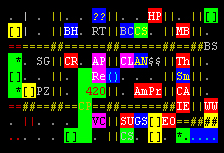
You also have a wristpad in your inventory, and can use it to see a map: try lmap to see a detailed graphical map of your area, split into tiles, with little lines and extra data on the side telling you all you could need to know! It even shows your corpmates, if they're nearby. If you're feeling old school, you can also try map, which looks like this:

Watching Your Step
Surprise surprise, the post-apocalyptic world is less than safe. Freedom City isn't so bad, but out in the big bad gameworld, it's smart to look before you walk. Try l direction to see where you're going and avoid RoboRapist3000. Obviously, you can't look through closed doors.
In addition, be careful of exits that are marked in red or blue! Red exits are climbs, and without sufficient climb skill, you may fall off of them and swan-dive into concrete. Blue exits are water exits, which require swim skill to do important things like not drown.